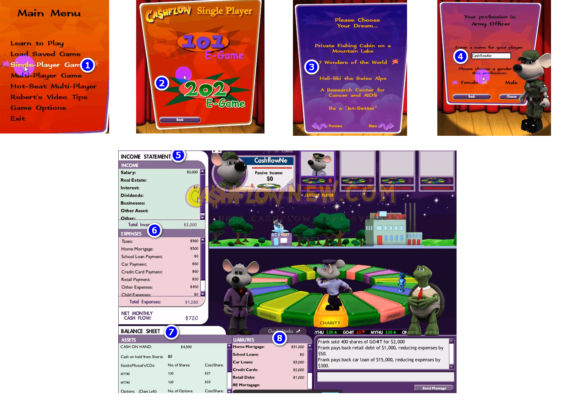
CASHFLOW 101 & 202 · PC E-Game

Learn to Escape the Rat Race by Playing CASHFLOW on Your PC

Robert Kiyosaki’s classic money game teaches assets, liabilities and passive income through play. Get the Windows edition with step-by-step installation help and video lessons, and start your first game today.

  • CASHFLOW 101, CASHFLOW 202 and CASHFLOW for Kids e-games
  • Detailed installation tutorial for Windows PCs and laptops
  • 25 video lessons covering every board space and core strategy
  • Fast digital delivery by email
Get the PC Edition Free Strategy Guides
cashflow game review

Why the CASHFLOW game works

Most people never learn how money really works. CASHFLOW lets you practice real financial decisions with play money, so mistakes cost you nothing and lessons stick.

🎲 Learn by doing

Every turn forces a decision: buy the deal, sell the stock, take the loan or walk away. You learn faster by doing than by reading.

📊 Read a financial statement

You track income, expenses, assets and liabilities on your own statement, the same skill investors use to judge any opportunity.

🏁 Build passive income

You win the Rat Race when passive income beats expenses. It is a simple goal that changes how you see your own paycheck.

Choose your edition

Digital download versions of the CASHFLOW e-game for Windows, delivered by email with setup instructions.

Get started in 3 simple steps

1

Order your edition

Choose CASHFLOW 101 & 202 or CASHFLOW for Kids and complete checkout.

2

Install with the tutorial

Follow the step-by-step guide to set the game up on your Windows PC or laptop.

3

Play and improve

Watch the video lessons, then use our free strategy guides to escape the Rat Race faster.

Frequently asked questions

What is the CASHFLOW game?

CASHFLOW is a financial education game designed by Robert Kiyosaki, author of Rich Dad Poor Dad. Players start in the “Rat Race” with a job and monthly expenses, then buy assets such as stocks, real estate and businesses until their passive income is greater than their expenses. That moves them to the “Fast Track,” where they race to buy their dream or reach $50,000 in monthly cash flow.

What is the difference between CASHFLOW 101 and 202?

CASHFLOW 101 teaches the fundamentals: income, expenses, assets, liabilities and getting out of the Rat Race. CASHFLOW 202 is the advanced version. It uses the same board but adds market volatility and techniques such as short selling and options, so it is best played after you are comfortable with 101.

Does the e-game run on Windows 10 and 11?

The package is made for Windows PCs and laptops and includes a detailed installation tutorial. If anything goes wrong during setup, contact our support team and we will help you get the game running.

Can I play on a Mac?

The CASHFLOW 101 & 202 package is built for Windows. CASHFLOW for Kids includes a macOS installer. For other options, see our Mac guide.

How is my order delivered?

This is a digital product. After payment, you receive your download and installation instructions by email.

Is CASHFLOW suitable for children?

Yes. CASHFLOW for Kids teaches the same core ideas with simpler rules and is designed for younger players, with versions for ages 5–7, 8–10 and 11–15.

Ready to play your first game?

Install CASHFLOW on your PC today and start practicing the money skills school never taught.

Get the PC Edition